About ideal case of just Flux operator and also Shallow water wave

This post was from a previous version of the WRF&MPAS-A Support Forum. New replies have been disabled and if you have follow up questions related to this post, then please start a new thread from the forum home page.
kaomiao

New member
Hi,

On the MPAS webiste, there are only three ideal tests and all for 3-D. Where can I find the ideal tests just for flux operator construction or the case of shallow water wave case? Thanks in advance.

Best,
Mei
 
Hi all,

I have compiled the core_sw and successfully generated the sw_model. However, there is a crucial problem when running the ./sw_model with the x1.2562.. mesh, as following,

" CRITICAL ERROR: Dimension 'nTracers' required by field 'tracers' was neither read nor defined. "

Do anyone know how to solve this or give me some tutorial for running this core?

Thanks,
Mei
 
The MPAS shallow-water model is minimally maintained and generally not supported, unfortunately. However, if you'd like to experiment with it, you can use any of the meshes available on the MPAS-Atmosphere mesh download page after making one change in the "src/core_sw/Registry.xml" file. You'll need to change this line in the <dims> tag:
Code:
              <dim name="nTracers"/>
to look like this:
Code:
              <dim name="nTracers"           definition="1"/>
The short explanation is that, in the past, we prepared input mesh files that defined one or more passive tracers to be transported in the shallow water model; but, the MPAS-Atmosphere meshes don't provide any tracers by default, so the "nTracers" dimension is not present in these mesh files.
 
Dear Mgduda,

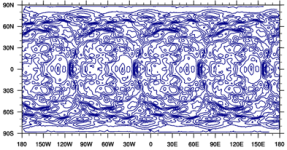
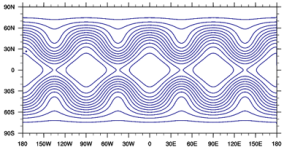
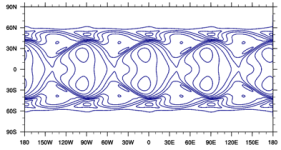
I have run the SW core with some test cases (change the option in namelist.sw). Most of the cases are fine, however, the result of test case 6 (Rossby-Haurwitz Wave) seems not that right, part of show bellow, the variable is "h" here.
initial condition:
Picture1.png

after one day:
Picture2.png

after four days:
Picture3.png

In fact, I think for this case the shape should not change, do you know what's the problem? Thanks a lot !
Btw, the mesh is x1.40962 and I have tried other resolution, got almost same results.


Best regards,
Mei
 
Back
Top