Hi everyone!
I'm trying to add a topography height with a resolution of 25 meters.
I'm using the library GitHub - openwfm/convert_geotiff: A commandline utility for converting GeoTIFF files for use in WRF to covert the .tif.
The code I'm using is:
After executing it I get some warnings:
However the files are created.
After that, I modify the GEOGRID.TBL.ARW, add the geodata "mtd_25+default" and run geogrid.
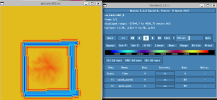
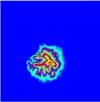
The running complete "correctly" however when I see the files geo_em.nc with the ncview and plot the variable HGT_M I get:
Thanks!
I'm trying to add a topography height with a resolution of 25 meters.
I'm using the library GitHub - openwfm/convert_geotiff: A commandline utility for converting GeoTIFF files for use in WRF to covert the .tif.
The code I'm using is:
./convert_geotiff -w 4 -t 1500 -u "meters MSL" - "25m topography" 136_MDT25_GC.tif
After executing it I get some warnings:
proj_create_operation_factory_context: /home/administrator/miniconda3/share/proj/proj.db contains DATABASE.LAYOUT.VERSION.MINOR = 2 whereas a number >= 3 is expected. It comes from another PROJ installation.
pj_obj_create: /home/administrator/miniconda3/share/proj/proj.db contains DATABASE.LAYOUT.VERSION.MINOR = 2 whereas a number >= 3 is expected. It comes from another PROJ installation.
proj_create_operation_factory_context: /home/administrator/miniconda3/share/proj/proj.db contains DATABASE.LAYOUT.VERSION.MINOR = 2 whereas a number >= 3 is expected. It comes from another PROJ installation.
pj_obj_create: /home/administrator/miniconda3/share/proj/proj.db contains DATABASE.LAYOUT.VERSION.MINOR = 2 whereas a number >= 3 is expected. It comes from another PROJ installation.
However the files are created.
After that, I modify the GEOGRID.TBL.ARW, add the geodata "mtd_25+default" and run geogrid.
The running complete "correctly" however when I see the files geo_em.nc with the ncview and plot the variable HGT_M I get:
min and max both 0 for variable HGT_M
Thanks!