Scheduled Downtime
On Friday 21 April 2023 @ 5pm MT, this website will be down for maintenance and expected to return online the morning of 24 April 2023 at the latest

Using "scale_region" tool for the 60 to 3 km mesh

anias

New member
Hello,
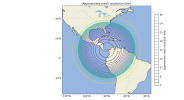
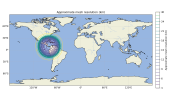
I am using the "scale_region" code to convert a 60–3 km mesh to a 20–1 km mesh, but the result looks strange. Even when I use a reduction factor of 2 instead of 3, the resulting mesh still appears incorrect, as shown in the attached images.
Am I using "scale_region" correctly?
Ania Sindermann
 

Attachments

  • mesh_resolution_in.png
    mesh_resolution_in.png
    461 KB · Views: 5
  • mesh_resolution_out.png
    mesh_resolution_out.png
    383.6 KB · Views: 5
What arguments are you providing to the scale_region tool? Also, how large is your regional cut-out from the 60-3 km mesh?
 
The arguments are:
python scale_region.py panama.static.nc panama_reescalat.static.nc 2 8.5 -80.0
The regional mesh was done with the .pts file:

Name: panama
Type: circle
Point: 8.5, -80.0
radius: 4500000.0

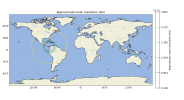
I attached an image with its domain
 

Attachments

  • mesh_resolution.png
    mesh_resolution.png
    678.3 KB · Views: 4
Apologies for the slow reply! Everything in your workflow -- the definition of a limited-area and the arguments to the scale_region.py script -- look correct to me. Just in case this is an issue in plotting the domain resolution, would you be able to attach the script that you've used to plot me contours of mesh resolution?
 
Hi, I reviewed my script for plotting the mesh contours, and it turns out the issue was in the script itself.
My code wasn’t accounting for the change from m² to sr in the AreaCell units when the regional mesh is scaled.
 
Top