Static File from Variable Resolution grid

F-Colby-UML

New member
I've been trying to create a static file from the 60-15km variable resolution grid. I have had no problems doing this for quai-uniform grids, following the tutorial examples and for my own limited area grids. For this one, however, I am getting this error message:
WARNING: Variable bdyMaskCell not in input file.
WARNING: Variable bdyMaskEdge not in input file.
WARNING: Variable bdyMaskVertex not in input file.
WARNING: File Ian-Var.grid.nc does not contain a seekable xtime variable. Forcing a read of the first time record.
real-data GFS test case
ERROR: ********************************************************************************
ERROR: Error opening file with terrain field, FILE:2022-09-25_00
ERROR: ********************************************************************************
ERROR: *************************************************************
ERROR: Blending of terrain along domain boundaries would fail, and
ERROR: config_blend_bdy_terrain = true in the namelist.init_atmosphere file.
CRITICAL ERROR: *************************************************************

I am attaching the error, namelist and streams files (all with .txt added to allow uploading). And am running v 8.2.2.

Any ideas what I am doing wrong?

Thanks,
Frank
 

Attachments

Based on your namelist.init_atmosphere, I suppose this is a case for creating MPAS initial condition. Please let me know if I am wrong.

What is the file "Ian-Var.grid.nc "? Your input file seems to be "yagi.static.nc".

Please clarify step-by-step how you set up this case. I am suspicious that your case failed because of errors in some input files.
 
Hi Ming,
Not sure where "yagi.static.nc" came from. grep on any of the files doesn't turn "yagi" up. Maybe it's another post? You have a bunch of items to work on!

I never used any input files. When downloading the quasi=uniform mesh files, the static file for the whole mesh comes with it. The variable mesh file had no such file. So I tried to follow the tutorial section 1.3.

1) downloaded the 60-15km variable mesh files.
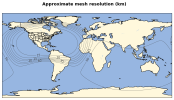
2) used grid_rotate to move the mesh to a new location. Image of mesh is attached.
3) renamed this mesh to be Ian-Var.grid.nc
4) created a folder called Ian-Var. The name refers to the Hurricane Ian and the Var to variable mesh.
5) Link the init_atmosphere executable
6) cp the namelist.init_atmosphere and streams.init_atmosphere files into Ian-Var/
7) ran gpmetis to create a new Ian-Var.graph.info.part.4 file for my 4 cores
8) edited the namelist.init_atmosphere file to have init_config_case be 7, connect to my static terrain and landuse files, and have the correct block_decomp_file_prefix.
9) edited the streams.init_atmosphere file to have the correct input and output files. Both of these namelist files were attached previously.
10) ran init_atmosphere. Result was the error messages shown in the log file which was also attached previously.

No new static.nc file was created. As shown in the streams.init_atmosphere file, Ian-Var.static.nc should have been created.

Not sure what happened here....
 

Attachments

  • mesh_resolution.png
    mesh_resolution.png
    269.5 KB · Views: 2
HI,

Thank you for clarifying the "yagi.static.nc" issue. You’re right—it comes from another user’s streams.init_atmosphere. I apologize for mistakenly attributing it to your file.

Please see my comments and questions below:

Hi Ming,
Not sure where "yagi.static.nc" came from. grep on any of the files doesn't turn "yagi" up. Maybe it's another post? You have a bunch of items to work on!

I never used any input files. When downloading the quasi=uniform mesh files, the static file for the whole mesh comes with it. The variable mesh file had no such file. So I tried to follow the tutorial section 1.3.

When you download the 60-15km mesh, you download both the mesh and the corresponding static file, is this right?

Please note that this is the static file corresponding to the original 60-15km mesh.

1) downloaded the 60-15km variable mesh files.
2) used grid_rotate to move the mesh to a new location. Image of mesh is attached.
3) renamed this mesh to be Ian-Var.grid.nc
4) created a folder called Ian-Var. The name refers to the Hurricane Ian and the Var to variable mesh.
5) Link the init_atmosphere executable
6) cp the namelist.init_atmosphere and streams.init_atmosphere files into Ian-Var/
7) ran gpmetis to create a new Ian-Var.graph.info.part.4 file for my 4 cores
8) edited the namelist.init_atmosphere file to have init_config_case be 7, connect to my static terrain and landuse files, and have the correct block_decomp_file_prefix.

What is the static file you used here? Did you create this file for your mesh ( i.e., the mesh with relocation of the refinement?)

If not, please create the static file corresponding to your mesh.

Then you can move on to run init_atmosphere to create MPAS initial condition.

9) edited the streams.init_atmosphere file to have the correct input and output files. Both of these namelist files were attached previously.
10) ran init_atmosphere. Result was the error messages shown in the log file which was also attached previously.

No new static.nc file was created. As shown in the streams.init_atmosphere file, Ian-Var.static.nc should have been created.

Not sure what happened here....
 
Frank,

This indicates that static data is not provided in the MPAS home page. Once you download the mesh, rotate the refinement to your desired location, you need to run init_atmosphere to create the static datafile.

In your post of April 22, the step (8) you listed , it is said that you connect to your static terrain and landuse files, ---- my questions is: did you create the static file yourself? Or you download it from somewhere?

To make this case successful, you need to create this static data based on your mesh. Please let me if you have created the static data, and you still have the issue when you try to create initial condition.

By the way, would you please upload the namelist for grid rotation? I may need to repeat your case to figure out what is wrong. Thanks.
 
Back
Top