To whom it may concern,
I am trying to implement a new surface drag method in WRF, so I want to check the symmetry in x- and y- directions.
The point I started at is the default WRF (no new code implemented), 2d idealized bell shaped mountain case (WRF/test/em_hill2d_x). I changed the default namelist.input to higher resolution, and changed the related part of code in dyn_em/module_initialize_ideal.F, namelist.input, and input_sounding to get a symmetric run in y-direction. Surprisingly, the two results are not the same.
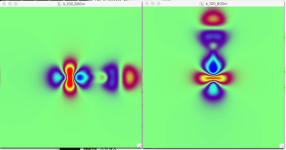
Then I tried to test the asymmetry I saw above, I changed the run from 2d to 3d. The mountain is still bell shaped, and totally symmetric in x- and y- directions. The only difference between my two runs are the input_sounding files, the winds are kept at 10m/s and potential temperatures are kept at 273K at all levels, the only difference is the wind is from west/south. Picture attached is drawn by ncview and you can see the obvious asymmetry between the two runs (U field in the left pic and V field in the right one, same color bar).
I am not sure what to do now, do you have any idea why there's the asymmetry between two directions?
Besides the picture, namelist.input is attached here. 3D test runs last for 5 minutes, resolutions are 40m, and runs are set to be open boundaries.
Thanks,
Li
I am trying to implement a new surface drag method in WRF, so I want to check the symmetry in x- and y- directions.
The point I started at is the default WRF (no new code implemented), 2d idealized bell shaped mountain case (WRF/test/em_hill2d_x). I changed the default namelist.input to higher resolution, and changed the related part of code in dyn_em/module_initialize_ideal.F, namelist.input, and input_sounding to get a symmetric run in y-direction. Surprisingly, the two results are not the same.
Then I tried to test the asymmetry I saw above, I changed the run from 2d to 3d. The mountain is still bell shaped, and totally symmetric in x- and y- directions. The only difference between my two runs are the input_sounding files, the winds are kept at 10m/s and potential temperatures are kept at 273K at all levels, the only difference is the wind is from west/south. Picture attached is drawn by ncview and you can see the obvious asymmetry between the two runs (U field in the left pic and V field in the right one, same color bar).
I am not sure what to do now, do you have any idea why there's the asymmetry between two directions?
Besides the picture, namelist.input is attached here. 3D test runs last for 5 minutes, resolutions are 40m, and runs are set to be open boundaries.
Thanks,
Li