
WRF 安装

m39

New member
Hello,
  我在Ubuntu18 安装WRF4.0,,Please help me!
运行./configure
checking for perl5... no
checking for perl... found /usr/bin/perl (perl)
Will use NETCDF in dir: /usr/mhm/Build_WRF/LIBRARIES/netcdf
Will use HDF5 in dir: /usr/mhm/Build_WRF/LIBRARIES/hdf5
Will use PHDF5 in dir: /usr/mhm/Build_WRF/LIBRARIES/hdf5
Will use 'time' to report timing information

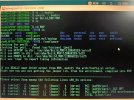
运行 ./compile出现了以下提示  

Usage:

compile [-j n] wrf compile wrf in run dir (NOTE: no real.exe, ndown.exe, or ideal.exe generated)

or choose a test case (see README_test_cases for details) :
compile [-j n] em_b_wave
compile [-j n] em_convrad
compile [-j n] em_esmf_exp
compile [-j n] em_fire
compile [-j n] em_grav2d_x
compile [-j n] em_heldsuarez
compile [-j n] em_hill2d_x
compile [-j n] em_les
compile [-j n] em_quarter_ss
compile [-j n] em_real
compile [-j n] em_scm_xy
compile [-j n] em_seabreeze2d_x
compile [-j n] em_squall2d_x
compile [-j n] em_squall2d_y
compile [-j n] em_tropical_cyclone
compile [-j n] nmm_real
compile [-j n] nmm_tropical_cyclone

compile -j n parallel make using n tasks if supported (default 2)
compile -h help message
 

Attachments
  • 1727013428597(1).jpg
    1727013428597(1).jpg
    4.8 MB · Views: 4
Last edited:
When you compile WRF, you will need to choose which test case you want to compile. The most common is 'em_real,' which is a real-data case. So you will need to type something like:

Code:
./compile em_real >& compile.log

See the Compiling chapter in the WRF Users' Guide for details.
感谢您的回复,但是我在运行./compile em_real 时又遇到了困难。
我安装的是WRF-4.1.2,gcc,gfortran是7.5版本。

这是库包版本,netcdf-4.1.3.,mpich-3.0.4,jasper-1.900.1.,libpng-1.2.50.,zlib-1.2.7.
 

Attachments

这是我的环境变量

#系统前置设置
export DIR=/home/mhm/Build_WRF/LIBRARIES
export CC=gcc
export CXX=g++
export FC=gfortran
export CFLAGS='-m64'
export F77=gfortran
export FFLAGS='-m64'
export LD_LIBRARY_PATH=$DIR/grib2/lib:$LD_LIBRARY_PATH
# netcdf
export PATH=$DIR/netcdf/bin:$PATH
export NETCDF=$DIR/netcdf
export LD_LIBRARY_PATH=$NETCDF/lib:$LD_LIBRARY_PATH

# mpich
export PATH=$DIR/mpich/bin:$PATH
# zlib
export LDFLAGS=-L$DIR/grib2/lib
export CPPFLAGS=-I$DIR/grib2/include
# WPS
export JASPERLIB=$DIR/grib2/lib
export JASPERINC=$DIR/grib2/include

#---hdf5---
export HDF5=$DIR/hdf5
export PATH=$HDF5/bin:$PATH
export LD_LIBRARY_PATH=$HDF5/lib:$LD_LIBRARY_PATH
 
第一个error
../../frame/pack_utils.o ../../frame/module_internal_header_util.o ../../frame/module_driver_constants.o ../../frame/module_machine.o ../../frame/module_wrf_error.o ../../frame/wrf_debug.o libwrfio_int.a ; \
rm -f module_wrf_error.o
 
这是我的环境变量

#系统前置设置
export DIR=/home/mhm/Build_WRF/LIBRARIES
export CC=gcc
export CXX=g++
export FC=gfortran
export CFLAGS='-m64'
export F77=gfortran
export FFLAGS='-m64'
export LD_LIBRARY_PATH=$DIR/grib2/lib:$LD_LIBRARY_PATH
# netcdf
export PATH=$DIR/netcdf/bin:$PATH
export NETCDF=$DIR/netcdf
export LD_LIBRARY_PATH=$NETCDF/lib:$LD_LIBRARY_PATH

# mpich
export PATH=$DIR/mpich/bin:$PATH
# zlib
export LDFLAGS=-L$DIR/grib2/lib
export CPPFLAGS=-I$DIR/grib2/include
# WPS
export JASPERLIB=$DIR/grib2/lib
export JASPERINC=$DIR/grib2/include

#---hdf5---
export HDF5=$DIR/hdf5
export PATH=$HDF5/bin:$PATH
export LD_LIBRARY_PATH=$HDF5/lib:$LD_LIBRARY_PATH
you can try to change -m64 to -fallow-argument-mismatch, that command more usefull with newest compiler version
 
Do kernel update also install some necesery program
sudo apt update
sudo apt upgrade
sudo apt install csh m4 build-essential nasm cmake unzip libxmu-dev libcairo-dev libbz2-dev libxaw7-dev libx11-dev xorg-dev flex bison subversion liburi-perl evince tcsh cpp m4 quota cvs libomp-dev python3-pip freeglut3-dev libjpeg-dev file
sudo apt install gcc g++ gfortran (i got version 10 above of all this compiler)
I use app folder for all library before install, and folder install for all library destination

cd app
install mpich
wget https://www.mpich.org/static/downloads/4.0.2/mpich-4.0.2.tar.gz
tar -xvzf mpich-4.0.2.tar.gz
cd mpich-4.0.2/
FFLAGS=-fallow-argument-mismatch FCFLAGS=-fallow-argument-mismatch ./configure --prefix=/home/user/install/mpich
make -j4
make install
source ~/.profile
cd ..
install zlib
wget https://www.zlib.net/fossils/zlib-1.2.11.tar.gz
tar -xvzf zlib-1.2.11.tar.gz
cd zlib-1.2.11/
./configure --prefix=/home/user/install/zlib
make
make install
cd ..
install hdf5
wget https://hdf-wordpress-1. s3. amazonaws. com/wp- content/uploads/manual/HDF5 /HDF5_ 1_12_2/source/hdf5-1. 12.2.tar.gz
tar -xvzf hdf5-1.12.2.tar.gz
cd hdf5-1.12.2/
./configure --prefix=/home/user/install/hdf5 --with-zlib=/home/user/install/zlib --enable-fortran --enable-fortran2003 --enable-cxx --with-default-api-version=v18
make
make install
source ~/.profile
cd ..
install curl
wget https://curl.se/download/curl-7.83.1.tar.gz
tar -xvzf curl-7.83.1.tar.gz
cd curl-7.83.1/
./configure --prefix=/home/user/install/curl --with-zlib=/home/user/install/zlib --without-ssl
make
make install
cd ..
install netcdf
install netcdf-c

wget https://www.gfd-dennou.org/arch/netcdf/unidata-mirror/netcdf-c-4.7.0.tar.gz
tar -xvzf netcdf-c-4.7.0.tar.gz
cd netcdf-c-4.7.0/
CFLAGS=-fPIC CPPFLAGS='-I/home/user/install/hdf5/include -I/home/user/install/curl/include' LDFLAGS='-L/home/user/install/hdf5/lib -L/home/user/install/curl/lib ' ./configure --prefix=/home/user/install/netcdf --enable-netcdf-4 --enable-netcdf4 --enable-shared --enable-dap
make -j4
make install
cd ..
install netcdf-fortran
wget https://www.gfd-dennou.org/arch/netcdf/unidata-mirror/netcdf-fortran-4.4.3.tar.gz
tar -xvzf netcdf-fortran-4.4.3.tar.gz
cd netcdf-fortran-4.4.3
CPPFLAGS='-I/home/user/install/netcdf/include' LDFLAGS='-L/home/user/install/netcdf/lib' FCFLAGS='-fallow-argument-mismatch' ./configure --prefix=/home/user/install/netcdf
make -j4
make install
source ~/.profile
cd ..
install libpng
wget https://src.fedoraproject.org/repo/...ff7d82fcefb40c0f48f88918/libpng-1.6.37.tar.gz
tar -xvzf libpng-1.6.37.tar.gz
cd libpng-1.6.37/
CPPFLAGS='-I/home/user/install/netcdf/include' FCFLAGS='-fallow-argument-mismatch' ./configure --prefix=/home/user/install/libpng
make
make install
source ~/.profile
cd ..
Install jasper
wget https://www.ece.uvic.ca/~frodo/jasper/software/jasper-2.0.10.tar.gz
tar -xvzf jasper-2.0.10.tar.gz
cmake -G "Unix Makefiles" -H/home/user/app/jasper-2.0.10 -B/home/user/app/jasper-2.0.10-build -DCMAKE_INSTALL_PREFIX=/home/user/install/jasper
cd jasper-2.0.10-build/
make install
source ~/.profile
cd ../..


Install WRF
Open WRF folder (use WRF version 4 or above)
Edit Configure
vi configure
Find
[ "$USENETCDFPAR" = = "1" ] ; then
Change to
if [ "$USENETCDFPAR" = "1" ] ; then
Configure and Compile
./configure (choose 34 for gfortran dan 1 default)
./compile em_real 2>&1 | tee compile_wrf.log
 
all path inside my ~/.profile
# mpich
export PATH=/home/user/install/mpich/bin:$PATH
# hdf5
export PATH=/home/user/install/hdf5/bin:$PATH
export LD_LIBRARY_PATH=/home/user/install/hdf5/lib:$LD_LIBRARY_PATH
# netcdf
export PATH=/home/user/install/netcdf/bin:$PATH
export NETCDF=/home/user/install/netcdf
export LD_LIBRARY_PATH=$NETCDF/lib:$LD_LIBRARY_PATH
# libpng
export LD_LIBRARY_PATH=/home/user/install/libpng/lib:$LD_LIBRARY_PATH
# jasper
export PATH=/home/user/install/jasper/bin:$PATH
export LD_LIBRARY_PATH=/home/user/install/jasper/lib:$LD_LIBRARY_PATH
export JASPERLIB=/home/user/install/jasper/lib
export JASPERINC=/home/user/install/jasper/include

I already try use ubuntu 18, 20, 22, redhat 6, 7 and this way work on that version
 
Back
Top