

William.Hatheway
Well-known member
WRF Configuration Studio v1.0.0 is now available for public testing.
Website: WRF Configuration Studio v1.0.0
GitHub: GitHub - HathewayWill/WRFConfigurationStudio: WRF Config Studio is a browser-based configuration tool for designing WRF domains, editing namelist.wps and namelist.input, exporting OBSPROC namelists, and reviewing WRF, WRFDA, OBSPROC, and Registry metadata.
The Weather Research and Forecasting Model is incredibly flexible, but that flexibility comes with a cost: many configuration choices have to be correct before WRF ever runs. Domain placement, projection, grid spacing, nesting, static geographic data, time controls, physics, dynamics, boundary conditions, data assimilation, observation processing, and input/output settings all have to work together. A WRF case can fail long before model integration begins if those pieces do not line up.
WRF Configuration Studio was built to make that process easier to see, organize, and review. It is not a replacement for WRF, WPS, WRFDA, or OBSPROC, and it does not run the model. Instead, it provides a browser-based environment where users can design domains, edit namelist.wps and namelist.input, work with WRFDA and OBSPROC settings, review Registry-derived metadata, see compatibility guidance, and export configuration files for use with the official WRF-family tools.
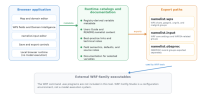
One of the main goals is transparency. The software does not silently rewrite scientific choices. Compatibility issues are shown to the user, required fields can generate warnings, and partial configurations can still be exported when that is intentional. The idea is to move more review work to the beginning of the workflow, when problems are easier and cheaper to fix.
The project also has a long technical lineage. NOAA/FSL graphical WRF Standard Initialization work in 2004 helped establish map-based WRF setup, grid definition, projection control, validation feedback, and user guidance. WRF Portal and WRF Domain Wizard continued that work in 2007–2008. Jiří Richter’s later browser-based WRF Domain Wizard became the direct software foundation for the domain-design portion of WRF Configuration Studio.
GIS4WRF was another important influence, especially for treating namelist relationships and compatibility as something that should be visible in a graphical environment. Its compatibility approach helped guide the design of WRF Configuration Studio’s metadata-driven rule system. That system was then developed using WRF Registry files as the primary structural source, with the WRF Users Guide, README.namelist, and related documentation providing additional validation and context.
The domain editor supports Lambert conformal, Mercator, Polar Stereographic, latitude-longitude, and rotated latitude-longitude workflows. Users can create parent and nested domains, adjust grid dimensions, reposition domains, review projection parameters, inspect WPS values, and catch common nest-geometry problems before running WPS.
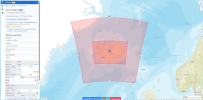
The standard map supports repeated 360-degree Web Mercator behavior, helping with dateline-adjacent domains while keeping exported WRF longitudes canonical.
A major feature in v1.0.0 is dedicated Northern and Southern Hemisphere polar visualization. Standard web maps do not represent the geographic poles well, so the Studio includes separate polar views for high-latitude work. Polar Stereographic configurations can be routed to the appropriate hemisphere while preserving the existing domain and WPS state. The polar views include graticules, coastlines, lakes, administrative boundaries, populated-place labels, marine labels, and Antarctic ice-shelf reference lines.
The important distinction is that the browser projection is for visualization and interaction. The exported WPS projection parameters remain the numerical configuration used by namelist.wps and the official WPS tools.
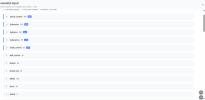
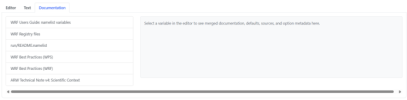
Beyond the map, the Studio includes a complete-catalog namelist.input editor. Instead of hiding advanced settings behind a simplified menu, the editor exposes the full variable set represented in the runtime catalog. Users can search variables, expand groups, review documentation and defaults, inspect source information, and see compatibility messages tied directly to affected settings.
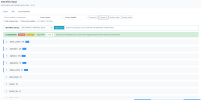
Version 1.0.0 includes 184 validated compatibility rules: 125 Hard, 35 Workflow, and 24 Soft. These rules cover documented relationships among physics schemes, WRFDA controls, workflow requirements, external files, and other configuration dependencies. The system is intentionally conservative. An unflagged combination is not proof that a configuration will run or that it is scientifically appropriate.
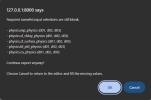
The Studio also supports WRFDA and OBSPROC workflows. WRFDA groups remain in namelist.input, while OBSPROC records are displayed in the same environment but exported separately as namelist.obsproc using the canonical record1 through record9 groups. Version 1.0.0 also includes presets for conventional-observation 3DVAR, FGAT, conventional-observation 4DVAR, 4DVAR radar, 4DVAR precipitation assimilation, WRFDA-Chem surface observations, and three OBSPROC output modes.
Documentation is built into the workflow. The package includes a Quick Start guide, User Guide, Technical Reference, project-lineage material, source notes, validation resources, examples, and historical NOAA/FSL references. At the variable level, the interface can surface WRF Users Guide material, Registry references, README.namelist information, best-practice resources, defaults, option metadata, version information, and runtime compatibility messages.
The current runtime catalog uses WRF 4.7.1 as the stable Registry baseline while also carrying version-aware metadata for newer source material. That does not mean the Studio only works with WRF 4.7.1, but version-dependent fields should still be checked against the Registry and documentation for the WRF version being used.
WRF Configuration Studio does not run geogrid.exe, ungrib.exe, metgrid.exe, real.exe, wrf.exe, obsproc.exe, or WRFDA executables. Its role ends at configuration preparation, visualization, metadata review, compatibility guidance, and export. A user can build a case on a laptop or workstation and then move the exported files to the HPC system where WRF is installed.
Testing focuses on whether the software correctly represents, preserves, checks, and exports configuration information. Regression testing covers namelist.wps, namelist.input, WRFDA groups, namelist.obsproc, compatibility warnings, required-field behavior, standard and polar domains, hemisphere routing, WPS-state preservation, dateline behavior, rotated lat-lon geometry, and safeguards against self-overlapping regional domains.
The larger goal is simple: WRF is complex because the atmosphere is complex. Hiding that complexity behind a wizard would eventually become misleading. WRF Configuration Studio instead organizes that complexity so users can see more of it before a run begins.
The goal is not to guarantee a successful forecast. It is to reduce preventable setup errors, improve configuration transparency, support teaching and review, and help users spend more time on the meteorology and less time untangling avoidable configuration problems.
Public testing is open now. I especially want users to test nested domains, polar and dateline-adjacent cases, rotated latitude-longitude workflows, WRFDA and OBSPROC configurations, compatibility rules, browser behavior, and anything that does not behave the way an experienced WRF user expects.
If you find something wrong, confusing, missing, or worth improving, please open an issue on GitHub.
Version: 1.0.0
License: GPL-3.0
Website: WRF Configuration Studio v1.0.0
GitHub: GitHub - HathewayWill/WRFConfigurationStudio: WRF Config Studio is a browser-based configuration tool for designing WRF domains, editing namelist.wps and namelist.input, exporting OBSPROC namelists, and reviewing WRF, WRFDA, OBSPROC, and Registry metadata.
The Weather Research and Forecasting Model is incredibly flexible, but that flexibility comes with a cost: many configuration choices have to be correct before WRF ever runs. Domain placement, projection, grid spacing, nesting, static geographic data, time controls, physics, dynamics, boundary conditions, data assimilation, observation processing, and input/output settings all have to work together. A WRF case can fail long before model integration begins if those pieces do not line up.
WRF Configuration Studio was built to make that process easier to see, organize, and review. It is not a replacement for WRF, WPS, WRFDA, or OBSPROC, and it does not run the model. Instead, it provides a browser-based environment where users can design domains, edit namelist.wps and namelist.input, work with WRFDA and OBSPROC settings, review Registry-derived metadata, see compatibility guidance, and export configuration files for use with the official WRF-family tools.
One of the main goals is transparency. The software does not silently rewrite scientific choices. Compatibility issues are shown to the user, required fields can generate warnings, and partial configurations can still be exported when that is intentional. The idea is to move more review work to the beginning of the workflow, when problems are easier and cheaper to fix.
The project also has a long technical lineage. NOAA/FSL graphical WRF Standard Initialization work in 2004 helped establish map-based WRF setup, grid definition, projection control, validation feedback, and user guidance. WRF Portal and WRF Domain Wizard continued that work in 2007–2008. Jiří Richter’s later browser-based WRF Domain Wizard became the direct software foundation for the domain-design portion of WRF Configuration Studio.
GIS4WRF was another important influence, especially for treating namelist relationships and compatibility as something that should be visible in a graphical environment. Its compatibility approach helped guide the design of WRF Configuration Studio’s metadata-driven rule system. That system was then developed using WRF Registry files as the primary structural source, with the WRF Users Guide, README.namelist, and related documentation providing additional validation and context.
The domain editor supports Lambert conformal, Mercator, Polar Stereographic, latitude-longitude, and rotated latitude-longitude workflows. Users can create parent and nested domains, adjust grid dimensions, reposition domains, review projection parameters, inspect WPS values, and catch common nest-geometry problems before running WPS.
The standard map supports repeated 360-degree Web Mercator behavior, helping with dateline-adjacent domains while keeping exported WRF longitudes canonical.
A major feature in v1.0.0 is dedicated Northern and Southern Hemisphere polar visualization. Standard web maps do not represent the geographic poles well, so the Studio includes separate polar views for high-latitude work. Polar Stereographic configurations can be routed to the appropriate hemisphere while preserving the existing domain and WPS state. The polar views include graticules, coastlines, lakes, administrative boundaries, populated-place labels, marine labels, and Antarctic ice-shelf reference lines.
The important distinction is that the browser projection is for visualization and interaction. The exported WPS projection parameters remain the numerical configuration used by namelist.wps and the official WPS tools.
Beyond the map, the Studio includes a complete-catalog namelist.input editor. Instead of hiding advanced settings behind a simplified menu, the editor exposes the full variable set represented in the runtime catalog. Users can search variables, expand groups, review documentation and defaults, inspect source information, and see compatibility messages tied directly to affected settings.
Version 1.0.0 includes 184 validated compatibility rules: 125 Hard, 35 Workflow, and 24 Soft. These rules cover documented relationships among physics schemes, WRFDA controls, workflow requirements, external files, and other configuration dependencies. The system is intentionally conservative. An unflagged combination is not proof that a configuration will run or that it is scientifically appropriate.
The Studio also supports WRFDA and OBSPROC workflows. WRFDA groups remain in namelist.input, while OBSPROC records are displayed in the same environment but exported separately as namelist.obsproc using the canonical record1 through record9 groups. Version 1.0.0 also includes presets for conventional-observation 3DVAR, FGAT, conventional-observation 4DVAR, 4DVAR radar, 4DVAR precipitation assimilation, WRFDA-Chem surface observations, and three OBSPROC output modes.
Documentation is built into the workflow. The package includes a Quick Start guide, User Guide, Technical Reference, project-lineage material, source notes, validation resources, examples, and historical NOAA/FSL references. At the variable level, the interface can surface WRF Users Guide material, Registry references, README.namelist information, best-practice resources, defaults, option metadata, version information, and runtime compatibility messages.
The current runtime catalog uses WRF 4.7.1 as the stable Registry baseline while also carrying version-aware metadata for newer source material. That does not mean the Studio only works with WRF 4.7.1, but version-dependent fields should still be checked against the Registry and documentation for the WRF version being used.
WRF Configuration Studio does not run geogrid.exe, ungrib.exe, metgrid.exe, real.exe, wrf.exe, obsproc.exe, or WRFDA executables. Its role ends at configuration preparation, visualization, metadata review, compatibility guidance, and export. A user can build a case on a laptop or workstation and then move the exported files to the HPC system where WRF is installed.
Testing focuses on whether the software correctly represents, preserves, checks, and exports configuration information. Regression testing covers namelist.wps, namelist.input, WRFDA groups, namelist.obsproc, compatibility warnings, required-field behavior, standard and polar domains, hemisphere routing, WPS-state preservation, dateline behavior, rotated lat-lon geometry, and safeguards against self-overlapping regional domains.
The larger goal is simple: WRF is complex because the atmosphere is complex. Hiding that complexity behind a wizard would eventually become misleading. WRF Configuration Studio instead organizes that complexity so users can see more of it before a run begins.
The goal is not to guarantee a successful forecast. It is to reduce preventable setup errors, improve configuration transparency, support teaching and review, and help users spend more time on the meteorology and less time untangling avoidable configuration problems.
Public testing is open now. I especially want users to test nested domains, polar and dateline-adjacent cases, rotated latitude-longitude workflows, WRFDA and OBSPROC configurations, compatibility rules, browser behavior, and anything that does not behave the way an experienced WRF user expects.
If you find something wrong, confusing, missing, or worth improving, please open an issue on GitHub.
Version: 1.0.0
License: GPL-3.0
Last edited: