Scheduled Downtime
On Friday 21 April 2023 @ 5pm MT, this website will be down for maintenance and expected to return online the morning of 24 April 2023 at the latest

Segmentation fault in wrf.exe

qingling

Member
Hi, all.

I'm using WRF-NoahMP from 2009-2014 to simulate irrigation in Xinjiang, China. However, model got the Segmentation fault when wrfout_d02_2010-01-07_10:00:00. My WRF version is 4.6.1 using ERA5 data as forcing data, and I'm using 120 cpu to run my case.
Hope you can give me some help, many thanks!

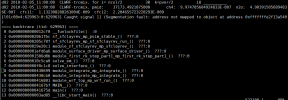
[l08c53n1:2916229:0:2916229] Caught signal 11 (Segmentation fault: address not mapped to object at address 0xfffffffe2f13a540)
==== backtrace (tid:2916229) ====
0 0x0000000000012cf0 __funlockfile() :0
1 0x0000000002061fbc sf_sfclayrev_mp_psim_stable_() ???:0
2 0x000000000205c70f sf_sfclayrev_mp_sf_sfclayrev_run_() ???:0
3 0x00000000029e20c1 module_sf_sfclayrev_mp_sfclayrev_() ???:0
4 0x0000000001efd6a6 module_surface_driver_mp_surface_driver_() ???:0
5 0x0000000001506d0b module_first_rk_step_part1_mp_first_rk_step_part1_() ???:0
6 0x00000000010c5ca0 solve_em_() ???:0
7 0x0000000000f0c1c8 solve_interface_() ???:0
8 0x0000000000430699 module_integrate_mp_integrate_() ???:0
9 0x0000000000430cb0 module_integrate_mp_integrate_() ???:0
10 0x0000000000416801 module_wrf_top_mp_wrf_run_() ???:0
11 0x00000000004167bf MAIN__() ???:0
12 0x000000000041675d main() ???:0
13 0x000000000003ad85 __libc_start_main() ???:0
14 0x000000000041667e _start() ???:0
=================================

forrtl: severe (174): SIGSEGV, segmentation fault occurred
Image PC Routine Line Source
libpthread-2.28.s 000014DA820C2CF0 Unknown Unknown Unknown
wrf.exe 0000000002061FBC Unknown Unknown Unknown
wrf.exe 000000000205C70F Unknown Unknown Unknown
wrf.exe 00000000029E20C1 Unknown Unknown Unknown
wrf.exe 0000000001EFD6A6 Unknown Unknown Unknown
wrf.exe 0000000001506D0B Unknown Unknown Unknown
wrf.exe 00000000010C5CA0 Unknown Unknown Unknown
wrf.exe 0000000000F0C1C8 Unknown Unknown Unknown
wrf.exe 0000000000430699 Unknown Unknown Unknown
wrf.exe 0000000000430CB0 Unknown Unknown Unknown
wrf.exe 0000000000416801 Unknown Unknown Unknown
wrf.exe 00000000004167BF Unknown Unknown Unknown
wrf.exe 000000000041675D Unknown Unknown Unknown
libc-2.28.so 000014DA81B20D85 __libc_start_main Unknown Unknown
wrf.exe 000000000041667E Unknown Unknown Unknown
 

Attachments

  • namelist.input
    6 KB · Views: 7
In your namelist.input, you set num_metgrid_levels = 30. However, the levels of ERA5 should be 38.

I am suspicious that the input data is wrong, leading to the model crash.

Please double check and let me know whether the data is really an issue in your case.
 
Last edited:
In your namelist.input, you set num_metgrid_levels = 30. However, the levels of ERA5 should be 38.

I am suspicious that the input data is wrong, leading to the model crash.

Please double check and let me know whether the data is really an issue in your case.
Thank you for your reply. 29 levels (1000hPa -50 hPa) of ERA5 were used to my experiments.So, I set num_metgrid_levels = 30 adding Single-level.
 
What other error messages did you get? Segmentation fault doesn't really provide helpful information for us to debug what is wrong.

Can you check your wrfout files right before the model crash to see whether there exist any unreasonable variables/patterns?

If all look fine, please recompile WRF in debug mode, then run wrf.exe starting from the latest wrfrst files. In this way, you can find exactly when and where the model crashes first. Such information is helpful for identifying issues in this case.
 
Last edited:
What other error messages did you get? Segmentation fault doesn't really provide helpful information for us to debug what is wrong.

Can you check your wrfout files right before the model crash to see whether there exist any unreasonable variables/patterns?

If all look fine, please recmpile WRF in debug mode, then run wrf.exe starting from the latest wrfrst files. In this way, you can find excatky when and where the model crashes first. Such information is helpful for identifying issues in this case.
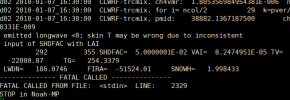
Thanks you for your reply! I will try. I also want to tell you that I have a similar simulation experiment, except for the different irrigation method set, all other settings are the same, and the simulation time is from October 2009 to December 2014. Then, there was an interruption at wrfout_D02_2010-01-07_10:00:00. However, the error reported in this experiment is the following. I suspect that these two errors are interchangeable.Meanwhile, I followed your method(emitted longwave <0; skin T may be wrong due to inconsistent input of SHDFAC with LAI) and still reported the same error.
1765504800635.png
 
This error message indicates that the physics went wrong in your case with unreasonable skin temp.

Your namelist.input looks fine to me, and devg =6 is a valid option for NoahMP. However, it seems that this option introduces unreasonbale SHDFAC in your case. This is not a model issue, but more like a data issue.

I would suggest that you set dveg =4, and hope this option can give you better SHDFAC.

Please try and let me know how it works.
 
This error message indicates that the physics went wrong in your case with unreasonable skin temp.

Your namelist.input looks fine to me, and devg =6 is a valid option for NoahMP. However, it seems that this option introduces unreasonbale SHDFAC in your case. This is not a model issue, but more like a data issue.

I would suggest that you set dveg =4, and hope this option can give you better SHDFAC.

Please try and let me know how it works.
Thanks a lot. I set dveg =4. The model ran for a month and then interrupted at wrfout_d02_2010-02-05_11:00:00, as shown in the following figure. So, these two errors have been converted into each other. I don't know if it's a problem with driving data?
1765933124655.png

But before, I conducted an experiment with the same parameter settings from January 1, 2010 to January 31, 2010, and found that the model would not interrupt at wrfout_d02_2010-01-07_10:00:00, and could completely run January 2010 without any errors. So, this small experiment indicates that it is not a problem with the ERA5 data from January 2010, but rather likely a problem with the model itself. I don't know if there is a problem with my understanding like this?

At the same time, in another experiment with the same setup, from October 1, 1999 to December 31, 2004, after running for 13 months, the model was interrupted at wrfout_d02_2000-11-22_10:00:00 and the same error occurred.

Based on the above questions, do I think the collapse of Noah-MP was caused by winter snow accumulation?
 
I don't have an immediate answer to your question why the case crashed. Please run the case in debug mode, identify when and where the model crash first, and check each individual components involved in the crash. This is what we usually do to debug possible issues.

You can also turn off irritation scheme and just run with NoahMP to see how the model works. We need to narrow down what schemes is responsible for the model crash.
 
I don't have an immediate answer to your question why the case crashed. Please run the case in debug mode, identify when and where the model crash first, and check each individual components involved in the crash. This is what we usually do to debug possible issues.

You can also turn off irritation scheme and just run with NoahMP to see how the model works. We need to narrow down what schemes is responsible for the model crash.
Thank you for your reply! I will try and provide timely feedback. Thank you very much!
 
@Ming Chen @qingling

Just a thought but this might be related to the wps step. I've seen this error when I read in surface && pressure data together when ungribing data from the compernicus website for ERA5 data.

Not sure if this will help
 
I don't have an immediate answer to your question why the case crashed. Please run the case in debug mode, identify when and where the model crash first, and check each individual components involved in the crash. This is what we usually do to debug possible issues.

You can also turn off irritation scheme and just run with NoahMP to see how the model works. We need to narrow down what schemes is responsible for the model crash.
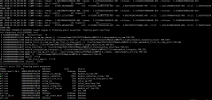
Hi,I run the debug mode. I restarted the model from wrfrst_d02_2010-01-04_00:00:00 and the model stopped in d01 2010-01-04_00:15:00 as shown in the following figue.
1767332571044.png
 
I don't have an immediate answer to your question why the case crashed. Please run the case in debug mode, identify when and where the model crash first, and check each individual components involved in the crash. This is what we usually do to debug possible issues.

You can also turn off irritation scheme and just run with NoahMP to see how the model works. We need to narrow down what schemes is responsible for the model crash.
I already know the final reason why the model report this error. VAI is too small (VAI = ELAI +ESAI). In subroutine phenology, there are two lines code to check ELAI and ESAI (IF (ESAI < 0.05 .and. CROPTYPE == 0) ESAI = 0.0 and IF ((ELAI < 0.05 .OR. ESAI == 0.0) .and. CROPTYPE == 0) ELAI = 0.0). But, this situation only occur when CROPTYPE == 0. In other word, when CROPTYPE==1 or 2 (crop is corn or soybean) and snow cover is big, ELAI and ESAI is small (3.5881997E-06) and not be set 0. Then, the FVEG (SHDFAC) is relative larger (5.00000001E-02).

This is why the error usually occurs in winter (January). It ofter snows in winter so that ELAI and ESAI is too small when opt_crop == 1.

So, I delet the CROPTYPE == 0 in the codes (IF (ESAI < 0.05 .and. CROPTYPE == 0) ESAI = 0.0 and IF ((ELAI < 0.05 .OR. ESAI == 0.0) .and. CROPTYPE == 0) ELAI = 0.0), and model run successfully.
 
Thank you for the update and your information is helpful for us to debug possible issues in LSM.

I have forwarded your post to our expert. Thanks again!
 
Top