Problem applying custom EGIS landuse dataset in WPS geogrid

aba0327

New member
Hello,


I am trying to apply a custom landuse dataset (EGIS Landuse for Korea) to WPS geogrid.
The dataset was converted into BIL tiles (200×200 pixels each, 30 arc-sec resolution), and I created an index file as follows:
INI:
type=categorical
category_min=1
category_max=21
projection=regular_ll
dx=0.00083333
dy=0.00083333
known_x=1
known_y=6201
known_lat=38.375263165
known_lon=125.074916365
wordsize=1
row_order=top_bottom
tile_x=200
tile_y=200
tile_z=1
missing_value=0
units="category"
description="EGIS Landuse KOREA"
mminlu="MODIFIED_IGBP_MODIS_NOAH"
iswater=17
islake=21
isice=15
isurban=13
I also updated GEOGRID.TBL with:
JavaScript:
===============================
name=LANDUSEF
        priority = 2
        dest_type = categorical
        z_dim_name = land_cat
        landmask_water =  egis_landuse_korea:17,21      # Calculate a landmask from this field
        interp_option =  egis_landuse_korea:nearest_neighbor
        rel_path =   egis_landuse_korea:egis_landuse_korea/
===============================
name=LANDUSEF
        priority=1
        dest_type=categorical
        z_dim_name=land_cat
        dominant = LU_INDEX

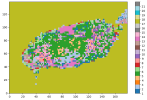
But when I run geogrid.exe, it fails:
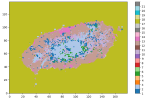
  • success image example
1758181034728.png
  • fail image
1758180905566.png

My questions:
  1. Is my index file configuration correct for multiple 200×200 tiles?
  2. Do all tiles need exactly the same extent, or only the same dx/dy and snapping?
  3. Are there common pitfalls when using custom categorical datasets for landuse (e.g., file naming, projection)?
I would appreciate any advice or examples from those who have successfully added custom landuse data into WPS.

Thanks in advance!
 

Attachments

Hi,
Please see my answers below:
Hello,


I am trying to apply a custom landuse dataset (EGIS Landuse for Korea) to WPS geogrid.
The dataset was converted into BIL tiles (200×200 pixels each, 30 arc-sec resolution), and I created an index file as follows:
INI:
type=categorical
category_min=1
category_max=21
projection=regular_ll
dx=0.00083333
dy=0.00083333
known_x=1
known_y=6201
known_lat=38.375263165
known_lon=125.074916365
wordsize=1
row_order=top_bottom
tile_x=200
tile_y=200
tile_z=1
missing_value=0
units="category"
description="EGIS Landuse KOREA"
mminlu="MODIFIED_IGBP_MODIS_NOAH"
iswater=17
islake=21
isice=15
isurban=13
I also updated GEOGRID.TBL with:
JavaScript:
===============================
name=LANDUSEF
        priority = 2
        dest_type = categorical
        z_dim_name = land_cat
        landmask_water =  egis_landuse_korea:17,21      # Calculate a landmask from this field
        interp_option =  egis_landuse_korea:nearest_neighbor
        rel_path =   egis_landuse_korea:egis_landuse_korea/
===============================
name=LANDUSEF
        priority=1
        dest_type=categorical
        z_dim_name=land_cat
        dominant = LU_INDEX

But when I run geogrid.exe, it fails:
  • success image example
View attachment 19111
  • fail image
View attachment 19110

My questions:
  1. Is my index file configuration correct for multiple 200×200 tiles?
It looks fine to me.
  1. Do all tiles need exactly the same extent, or only the same dx/dy and snapping?
All tiles must have the same extent. Please take a look at the examples in WPS_GEOG for Modis and/or USGS landuse type.
  1. Are there common pitfalls when using custom categorical datasets for landuse (e.g., file naming, projection)?
No I don't think so.
I would appreciate any advice or examples from those who have successfully added custom landuse data into WPS.

Thanks in advance!
Please take a look at the document https://www2.mmm.ucar.edu/wrf/users/tutorial/presentation_pdfs/201707/wps_advanced.pdf, which gives detailed information how to introduce new datasets to WPS.
 
May I ask, have you resolved it? I've encountered the same issue. If you've managed to resolve it, might I ask how you did so?
 
Back
Top