Scheduled Downtime
On Friday 21 April 2023 @ 5pm MT, this website will be down for maintenance and expected to return online the morning of 24 April 2023 at the latest

When simulating using data that subdivides buildings in MODIS landuse data, wrf.exe terminated without reporting any errors.

Xiaoyang Lin

New member
Dear WRF team,

Before posting this question, I made every effort to search the forum for relevant information. However, I was unable to find a solution, so I am posting this thread to seek assistance.

I plan to use WRF-BEM to simulate air-conditioning energy consumption at the urban scale. The MODIS landuse dataset (MCD12Q1), which includes 17 landuse categories with type 13 representing buildings, was used as the base dataset. To align with modifications of the "urban canopy parameters" in URBPARM.TBL, the building category was further subdivided into three classes based on land surface imperviousness: 31 (low-density residential), 32 (high-density residential), and 33 (commercial/industrial).
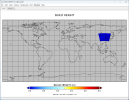
After running geogrid.exe, I checked the generated geo_em file and confirmed that the landuse data had been successfully applied, as shown in Fig. 1. The subsequent preprocessing steps and real.exe ran normally; however, when running wrf.exe, the model stopped without producing any error messages in rsl.error. Running wrf.exe generated wrfout files for d01 and d02 at the initial time, but the simulation stopped at d03.

I have tried the following:
  1. Verify that the WRF version is 4.6 and confirm that it has been compiled correctly and is able to run other test cases.
  2. Use the command "ulimit -s unlimited" to remove memory restrictions.
  3. Use the command "grep -rn "cfl" rsl.*" to check for any CFL errors, and consider reducing the time step.
  4. Based on online recommendations, consider using more stable physical schemes:
    • Change cu_physics from 1,0,0 (Kain-Fritsch scheme) to 3,0,0 (Grell-Freitas cumulus scheme).
    • Change mp_physics from 16,16,16 to 8,8,8 (Thompson microphysics scheme).
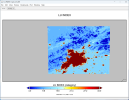
Using the above methods did not resolve the problem. I have now found that the values for urban canopy parameters, such as building height and building area fraction, in the wrf_input file generated by real.exe are all zero, as shown in Fig. 2. I am unsure whether URBPARM.TBL is read only by real.exe or by both real.exe and wrf.exe, although the rsl file generated during the wrf.exe run indicates that wrf.exe extracts data from URBPARM.TBL. I also tried using the CGLC-MODIS-LCZ 100 m dataset from the WRF official website along with URBPARM_LCZ.TBL to run real.exe, but again found that the urban canopy parameters in wrf_input were all 0. Despite this, wrf.exe runs normally.

Therefore, I have a few questions and would greatly appreciate your guidance:
  1. URBPARM.TBL is read only by real.exe or by both real.exe and wrf.exe? Does the fact that the urban canopy parameters are 0 in the wrf_input file indicate that URBPARM.TBL was not read correctly?
  2. The possible reasons why wrf.exe stopped running without reporting an error?
The attachment has been included for your reference.
 

Attachments

  • Fig.1 LU_INDEX of geo_em.d03.png
    Fig.1 LU_INDEX of geo_em.d03.png
    461.7 KB · Views: 5
  • Fig2. BUILD_HEIGHT in wrfinput_d01.png
    Fig2. BUILD_HEIGHT in wrfinput_d01.png
    234.5 KB · Views: 4
  • rsl.error.0000
    16.8 KB · Views: 5
  • namelist.wps
    1.2 KB · Views: 1
  • namelist.input
    4 KB · Views: 7
  • URBPARM.TBL
    12 KB · Views: 4
Your namelist files look good.

Have you checked all the rsl files for this case? The error message doesn't necessarily exist in rsl.error.0000. It can be randomly shown in other rsl files. Please check and let me what you can find.

Also, if you change sf_surface_physics from 4 to 2, can you run this case successfully?
 
Your namelist files look good.

Have you checked all the rsl files for this case? The error message doesn't necessarily exist in rsl.error.0000. It can be randomly shown in other rsl files. Please check and let me what you can find.

Also, if you change sf_surface_physics from 4 to 2, can you run this case successfully?
Thank you for your recommendations!
After performing simulations using version 4.3 of WRF instead of version 4.6, wrf.exe runs as expected; however, the wrf_input file produced by real.exe still fails to import the urban canopy parameters. Could you kindly assist with my first question:
  • URBPARM.TBL is read only by real.exe or by both real.exe and wrf.exe? Does the fact that the urban canopy parameters are 0 in the wrf_input file indicate that URBPARM.TBL was not read correctly?
 
Last edited:
Thank you for your recommendations!
After performing simulations using version 4.3 of WRF instead of version 4.6, wrf.exe runs as expected; however, the wrf_input file produced by real.exe still fails to import the urban canopy parameters. Could you kindly assist with my first question:
  • URBPARM.TBL is read only by real.exe or by both real.exe and wrf.exe? Does the fact that the urban canopy parameters are 0 in the wrf_input file indicate that URBPARM.TBL was not read correctly?

URBPARM.TBL is read only when wrf.exe starts. Those variables in wrfinput are irrelevant to variables in URBPARM.TBL
 
The absence of urban canopy parameter descriptions in the wrfinput file is primarily due to issues that occurred during the previous WPS module processing. After examining numerous descriptions of geogrib.tbl files on GitHub, I found that:

===============================
name=URB_PARAM
priority=1
optional=yes
dest_type=continuous
fill_missing = 0.
z_dim_name=num_urb_params
interp_option=default:nearest_neighbor
rel_path=default:NUDAPT44_1km/
flag_in_output=FLAG_URB_PARAM
===============================
name=FRC_URB2D
priority=1
optional=yes
dest_type=continuous
fill_missing = 0.
interp_option=default: average_gcell(2.0)+four_pt
rel_path=default:urbfrac_nlcd2011/
flag_in_output=FLAG_FRC_URB2D

These configurations are typically only set for the United States, which is why they don't appear in the geo_em files we generated. I believe these two datasets may provide significant assistance for the operation of the urban canopy module. However, errors are often not reported during the running process.
 
You are right that these variables are only available over US. However, in areas where they are missing, WRF will use default values and the model should still be able to run successfully.

By the way, we are preparing a global dataset that includes these variables worldwide. Please pay attention to our announcement.
 
Hi,

I have exactly the same problem - when I try
sf_urban_physics = 1,1,
wrf stops without any errors.

If
sf_urban_physics = 0,0
wrf runs OK

Any thoughts ?

Thanks,

Andrei
 
I did additional tests.

If
sf_urban_physics = 1,0
wrf runs OK

If
sf_urban_physics = 0,1
wrf stops without errors.

Why it could be like this ?
Could it be somehow connected to nest definition or something nest related?

Andrei
 
Thank you very much for looking into this.

i am using WRF 452.
Coarse domain 12 km, nest 4km.
Domains are subsets of CONUS 12.
Attached is namelist.input.

Appreciate any suggestions.

Andrei.
 

Attachments

  • namelist_andrei_wrf_urban.txt.txt
    11 KB · Views: 5
Hi Andrei,

In your namelist.input, I can see that you set urban physics correctly, i.e.,

sf_urban_physics = 1,1

I would expect that with this option, your case should be done successfully.

If sf_urban_physics = 0,1

or

sf_urban_physics = 1,0,

Then certain inconsistencies may occur between D01 and D02, leading to model crash later.

Please keep me updated about your case and hope it works fine.
 
Top