ungrib.exe w/ Intel compilers doesn't write "FILE" (Possible solution)

D

Deleted member 3607

Guest
For some reason when using Intel Compilers it is defaulting the output file name to "PFILE" instead of "FILE"

This then causes all the following commands to break because it is looking for a file that isn't there.

Environment is the same as this post for a similar error:
 

Attachments

PATH
will@will-MS-7D91:~/WRF_Intel/WPS-4.4$ echo $PATH
/home/will/WRF_Intel/Libs/grib2/lib:/opt/intel/oneapi/vtune/2023.0.0/bin64:/opt/intel/oneapi/vpl/2023.0.0/bin:/opt/intel/oneapi/mpi/2021.8.0//libfabric/bin:/opt/intel/oneapi/mpi/2021.8.0//bin:/opt/intel/oneapi/mkl/2023.0.0/bin/intel64:/opt/intel/oneapi/itac/2021.8.0/bin:/opt/intel/oneapi/intelpython/latest/bin:/opt/intel/oneapi/inspector/2023.0.0/bin64:/opt/intel/oneapi/dpcpp-ct/2023.0.0/bin:/opt/intel/oneapi/dev-utilities/2021.8.0/bin:/opt/intel/oneapi/debugger/2023.0.0/gdb/intel64/bin:/opt/intel/oneapi/compiler/2023.0.0/linux/lib/oclfpga/bin:/opt/intel/oneapi/compiler/2023.0.0/linux/bin/intel64:/opt/intel/oneapi/compiler/2023.0.0/linux/bin:/opt/intel/oneapi/clck/2021.7.2/bin/intel64:/opt/intel/oneapi/advisor/2023.0.0/bin64:/home/will/WRF_Intel/miniconda3/condabin:/home/will/.local/bin:/usr/local/sbin:/usr/local/bin:/usr/sbin:/usr/bin:/sbin:/bin:/usr/games:/usr/local/games:/snap/bin:/snap/bin

LD_LIBRARY_PATH
will@will-MS-7D91:~/WRF_Intel/WPS-4.4$ echo $LD_LIBRARY_PATH
/home/will/WRF_Intel/Libs/grib2/lib:/home/will/WRF_Intel/Libs/NETCDF/lib:/opt/intel/oneapi/vpl/2023.0.0/lib:/opt/intel/oneapi/tbb/2021.8.0/env/../lib/intel64/gcc4.8:/opt/intel/oneapi/mpi/2021.8.0//libfabric/lib:/opt/intel/oneapi/mpi/2021.8.0//lib/release:/opt/intel/oneapi/mpi/2021.8.0//lib:/opt/intel/oneapi/mkl/2023.0.0/lib/intel64:/opt/intel/oneapi/itac/2021.8.0/slib:/opt/intel/oneapi/ipp/2021.7.0/lib/intel64:/opt/intel/oneapi/ippcp/2021.6.3/lib/intel64:/opt/intel/oneapi/ipp/2021.7.0/lib/intel64:/opt/intel/oneapi/dnnl/2023.0.0/cpu_dpcpp_gpu_dpcpp/lib:/opt/intel/oneapi/debugger/2023.0.0/gdb/intel64/lib:/opt/intel/oneapi/debugger/2023.0.0/libipt/intel64/lib:/opt/intel/oneapi/debugger/2023.0.0/dep/lib:/opt/intel/oneapi/dal/2023.0.0/lib/intel64:/opt/intel/oneapi/compiler/2023.0.0/linux/lib:/opt/intel/oneapi/compiler/2023.0.0/linux/lib/x64:/opt/intel/oneapi/compiler/2023.0.0/linux/lib/oclfpga/host/linux64/lib:/opt/intel/oneapi/compiler/2023.0.0/linux/compiler/lib/intel64_lin:/opt/intel/oneapi/ccl/2021.8.0/lib/cpu_gpu_dpcpp
 
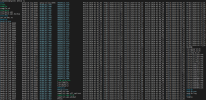
The error starts in ungrib.exe here are the log files without using mpirun -np 32

As you can see it writes a PFILE not a FILE
 

Attachments

It appears that ungrib.exe doesn't make a second pass to change pfile to file.

Not sure how to fix this
 
It appears that ungrib.exe doesn't make a second pass to change pfile to file.

Not sure how to fix this

Possible solution:

Ahead of WPS programs, you for INTEL specifically, you MUST set
ulimit -s unlimited

Now why does this make ungrib work...I don't know but it is a temporary fix to the issue until NCAR comes up with a solution.
 
This issue is not specific to the Intel processor. Any time the ungrib program does not complete for some reason, the final "FILE" format is not written and the files remain as "PFILE." It could just be that your files are really large, but I'm not sure. Are you running ungrib serially or with parallel processing?
 
This issue is not specific to the Intel processor. Any time the ungrib program does not complete for some reason, the final "FILE" format is not written and the files remain as "PFILE." It could just be that your files are really large, but I'm not sure. Are you running ungrib serially or with parallel processing?
I tried it with both serial and parallel.

The solution changing the ulimit seems to fix it.

My guess is that the Intel compilers set the ulimit variable to a small value by default.
 
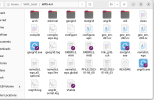
Hello, I tried ulimit -s unlimited command when ./ungrib.exe, but the output files are still PFILE (shown as directory_info.png).

I wonder if I set the unlimited command right with mpiexec command (run_ungrib.sh).

I guess it maybe ERA5 data too large, according to the previous discussion. But I really hope to solve this problem…

ungrib.log and my environment settings are also provided as attached.
I'm not sure if I should attach other files. I will upload other files as soon as possible if anyone requests.
Any response are welcome! Thank you!
 

Attachments

Last edited:
@f930139
You are trying to run ungrib with distributed memory processing and the ungrib program must be run serially, even if you compiled the WPS program for distributed memory processing. Only geogrid and metgrid can be run with multiple processors. The ungrib program is not completing, which is why the files are not changed from 'PFILE' to 'FILE.'
 
@f930139
You are trying to run ungrib with distributed memory processing and the ungrib program must be run serially, even if you compiled the WPS program for distributed memory processing. Only geogrid and metgrid can be run with multiple processors. The ungrib program is not completing, which is why the files are not changed from 'PFILE' to 'FILE.'
Thank you @kwerner :D
I would like to say something suprising! The ungrib.exe runned successfully after I downloaded ERA5 data from Copernicus (instead of RDA). I changed only the ERA5 grib files and ungrib.exe worked!
I'm not sure why but just provide some experiences.
 
I would like to say something suprising! The ungrib.exe runned successfully after I downloaded ERA5 data from Copernicus (instead of RDA). I changed only the ERA5 grib files and ungrib.exe worked!
That is great news! Thank you so much for the update.
 
Back
Top