Hi,
I'm using ERA5 pressure-level and surface data as forcing for a WRF simulation over Chicago. Initially, I used the recently published era5_to_int.py tool to convert ERA5 netCDF files to intermediate and then metgrid files, following the workflow described here:
 forum.mmm.ucar.edu
However, the simulation driven by these metgrid files produced problematic output—temperature-related fields show irregular, blocky edges along Lake Michigan, as the issue discussed here:
forum.mmm.ucar.edu
Because of this, I switched to the traditional GRIB-based workflow for ERA5. Here are the steps I took:
/glade/derecho/scratch/hhou/TestData/GribData_ERA5
as pl.grib and sfc.grib. The Python scripts used for downloading are in the same directory.
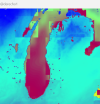
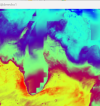
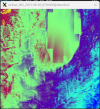
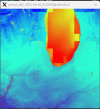
Unfortunately, even using the traditional GRIB workflow, the resulting temperature fields still show irregular edges over Lake Michigan.
T2
TMN
After discussing with colleagues and examining the met_em* and wrflowinp* files, our current hypothesis is that the issue may be related to unmatched coastlines of SST field:
sst in met_em*

sst in wrflowinp*
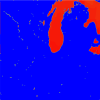
My WPS version is 4.6, and my WRF version is 4.7.1. Looks like they are incapable of ingesting ERA5 SST fields through the WPS/real process. However, this is still only a hypothesis.
Given that many WRF users work with ERA5 forcing—often over coastal domains—I would like to ask:
Is this type of coastal edge artifact a known issue when using ERA5, particularly for domains that include coastlines? If so, is there a recommended solution or workaround?
Any insights would be appreciated.
Cheers,
Henry
I'm using ERA5 pressure-level and surface data as forcing for a WRF simulation over Chicago. Initially, I used the recently published era5_to_int.py tool to convert ERA5 netCDF files to intermediate and then metgrid files, following the workflow described here:
Question about Required ERA5 Data (ml and Invariant) for era5_to_int.py
Hi, I'm using the era5_to_int.py tool to process downloaded ERA5 pressure-level (pl) and surface (sfc) NetCDF (.nc) data into intermediate files for subsequent metgrid preprocessing. According to my colleague’s experience using ERA5 GRIB (.grb) data, only the pl and sfc datasets are required...
forum.mmm.ucar.edu
However, the simulation driven by these metgrid files produced problematic output—temperature-related fields show irregular, blocky edges along Lake Michigan, as the issue discussed here:
Using era5_to_int.py for ERA5 Pressure-Level Input but Getting Requests for ML Files
Hi, I’m using the era5_to_int.py tool to process ERA5 data into the intermediate files required for met_grid. I would like to use pressure-level (pl) data as the input. I have collected the pl, surface (sfc), and invariant datasets in my data directory, and I’m running the following command...
forum.mmm.ucar.edu
Because of this, I switched to the traditional GRIB-based workflow for ERA5. Here are the steps I took:
- Used the cdsapi package and Python scripts to download:
- Pressure-level data from “ERA5 hourly data on pressure levels from 1940 to present”
- Surface data from “ERA5 hourly data on single levels from 1940 to present”
/glade/derecho/scratch/hhou/TestData/GribData_ERA5
as pl.grib and sfc.grib. The Python scripts used for downloading are in the same directory.
- Followed the method described in this post to ungrib pl.grib and sfc.grib separately, producing intermediate files with distinct prefixes.
- Ran metgrid using these intermediate files to create met_em* files, which are located in:
- Linked the met_em* files to my WRF directory and ran real and wrf from:
Unfortunately, even using the traditional GRIB workflow, the resulting temperature fields still show irregular edges over Lake Michigan.
T2
TMN
After discussing with colleagues and examining the met_em* and wrflowinp* files, our current hypothesis is that the issue may be related to unmatched coastlines of SST field:
sst in met_em*
sst in wrflowinp*
My WPS version is 4.6, and my WRF version is 4.7.1. Looks like they are incapable of ingesting ERA5 SST fields through the WPS/real process. However, this is still only a hypothesis.
Given that many WRF users work with ERA5 forcing—often over coastal domains—I would like to ask:
Is this type of coastal edge artifact a known issue when using ERA5, particularly for domains that include coastlines? If so, is there a recommended solution or workaround?
Any insights would be appreciated.
Cheers,
Henry
Last edited: